
Practice records · Keep the conditions with the time
Set a Fair Baseline for Timed Jigsaw Practice
Quick summary
A quicker time is easier to interpret when you know what stayed the same. A familiar picture, a larger display or a different reference rule can change the task. Keep those conditions beside the number before calling it progress.
This timed jigsaw puzzle practice guide gives you a record to copy and two real browser control samples. The recording method is our own practical proposal. We have not tested whether following it improves solving speed.
Key takeaways
- 01Compare completed attempts under a stated set of conditions.
- 02Keep first encounters and replays in separate groups.
- 03Record interruptions and unfinished sessions without turning them into finish times.
Choose what you want to compare
Start with one question. You might compare replays of the same picture on your usual laptop, or record first attempts at one piece count. Write that choice before starting. Mixing both groups makes the results harder to read.
Speed Puzzling’s FAQ suggests using a puzzle from its previous contests when comparing yourself with its published results. The useful principle here is matching the task. A personal speed puzzling baseline on this site should identify the actual image and settings used.
Read Speed Puzzling’s FAQ about timing and comparisons.
Choose a count you can finish comfortably enough to record a complete attempt. The current choices are Easy with 12 pieces, Medium with 24, Hard with 48 and Expert with 96. Keep that count fixed for the comparison you have chosen.
Keep the same settings with every result
Use the fields below in a notebook or spreadsheet. The CSV download supplies the same headings for readers who want to track jigsaw practice time outside the game. It is a blank recording aid, separate from the site’s saved games.
| Field | What to write |
|---|---|
| Date and image | Date, gallery title or your own filename; distinguish different crops. |
| Pieces | Exact piece count and difficulty. |
| Device and input | Computer or tablet, browser, display setup, mouse, trackpad or touch. |
| Zoom and reference | Starting zoom and whether the reference may stay open or be consulted. |
| Pauses | Your pause rule, actual breaks and any studying or moving while paused. |
| Familiarity | First encounter, known image or replay; note uncertainty. |
| Result | Finished or unfinished, displayed time, progress and any interruption. |
Download the blank practice record CSV.
Before the first run, pick a reference rule you can repeat. Keep the same device and input method where practical. If you change from touch to a mouse, start a separate group of results. You can compare the experiences later without treating them as identical conditions.
Decide what a pause means before starting
The current game timer starts after the puzzle initializes. The pause control freezes the displayed counter. In our Chrome check, the picture remained visible while paused, and we could open the reference and move a loose piece without advancing that counter.
For uninterrupted timed practice, leave the clock running while you inspect the picture or think about a piece. If a call or another interruption makes you pause, record it. A session with study during a pause belongs in a separate category from a continuous attempt.
Record the game’s displayed time as displayed time. If you also want total wall time, use a separate clock and give it its own field. Do not silently replace one with the other. Our check confirmed the pause behavior, but did not establish stopwatch accuracy across every browser or background-tab condition.
Read two real records without inventing a speed gain
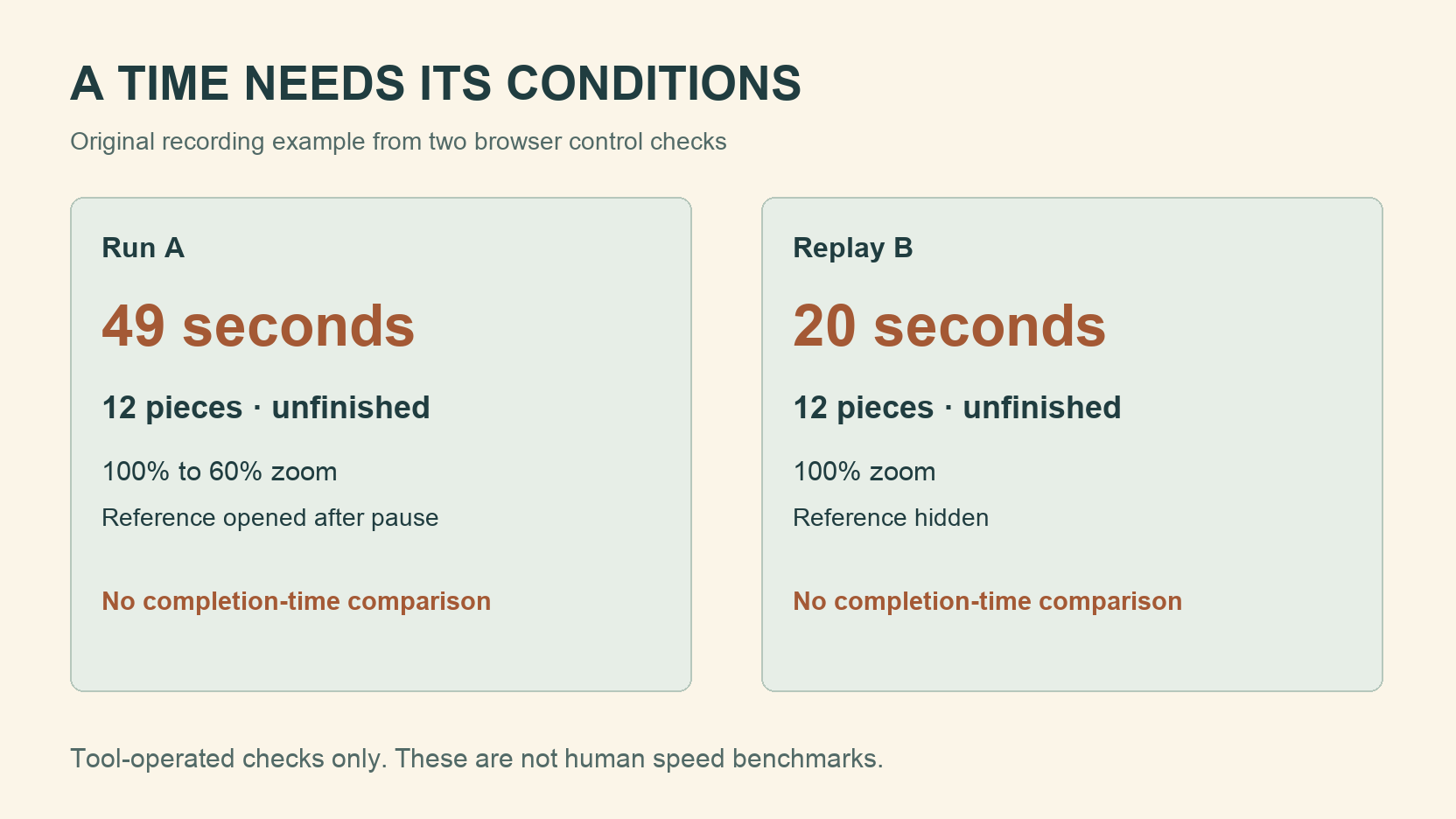
On October 28, 2026, we opened Mountain Sunset at 12 pieces in Chrome on a Mac desktop twice. These were tool-operated interface checks, not human solving trials. Both stopped unfinished, with the progress display at 0/12.
| Run | Displayed time at pause | Conditions | Result |
|---|---|---|---|
| A, first run in this check | 49 seconds | Paused at 49 seconds, then changed zoom from 100% to 60%, opened the reference and moved one loose piece. | Unfinished; exclude from completion-time baseline. |
| B, same-image replay | 20 seconds | Kept 100% zoom and reference hidden; paused without completing the board. | Unfinished; exclude from completion-time baseline. |
Download the actual control sample CSV.
The second number is smaller because we stopped that check earlier. Neither check produced a completion time. The notes also preserve zoom and reference changes made after the first pause, which would matter if that run were resumed.
Prior familiarity with Mountain Sunset was not measured. Run A means the first run in this pair of checks, so it cannot serve as evidence of a first encounter with the image. Use similarly precise wording in your own notes when you cannot remember whether you have seen a picture before.
Separate first attempts from replays
For a replay series, finish a board and record the result, then identify each later attempt as a replay. Familiarity is part of that series. For first-attempt records, use pictures you have not previously assembled and keep the count and help rules consistent.
A new start can scatter the loose pieces differently. The current site uses a time-based shuffle, so selecting the same image and count does not recreate an identical starting layout. Keep that variation in mind when a result differs only slightly.
Keep an unusual slow result in the record even if you exclude it from a particular comparison. Write the reason beside it, such as an interruption or changed input device, so the decision remains understandable later.
Interpret a small set of results cautiously
After several completed attempts, read the conditions before choosing which times to compare. Keep the fastest result and the middle result together. Retain unfinished sessions separately, with their stop time and progress, so an early stop never becomes a personal best.
The site’s efficiency score uses its own move and time assumptions. It is not an industry ranking or a validated measure of your ability. Use the time and conditions you recorded when reviewing this exercise.
Keep comparisons within this digital activity. The 2026 World Championship rules specify a physical 500-piece puzzle for the individual first round. A 96-piece browser board has different controls and piece handling, so its time cannot be converted into a championship result.
Conclusion
Open the gallery, choose one picture and write down your conditions before you start. Leave enough room beside the result for the detail that changed your session.
Sources and further reading
Frequently asked questions
Next move
Start a recorded practice session
Choose an image and count before starting the clock.